
Database ops for people on call.
DBA Brain collects health metrics from SQL Server, Oracle, PostgreSQL and MySQL, grades them against policies you write, proves backups by restoring them, and tells you about it: on a schedule, without an agent on any monitored machine.
- Four enginesSQL Server, Oracle, PostgreSQL, MySQL
- No agentInstalls nothing on your databases
- No telemetryNothing sent you did not switch on
- About ninety metricsAvailability to security, graded by your policy
- Apache 2.0Free and open source
Graded verdicts, not raw rows
Health metrics from your SQL Server, Oracle, PostgreSQL and MySQL instances, graded against policies you write; your scheduled SQL; backups proven by restoring them; objectives checked against real measurement history. No telemetry, no usage reporting, no update check. It connects to the databases and hosts you list; with a dbabrain key, once a day to dbabrain.dev to check that key; and only if you turn each on, to a chat service and to the AI (through dbabrain.dev, or a model's API on your own key). Nothing else.
Health metrics
Around ninety metrics across four engines: availability, capacity, performance, recoverability, security, maintenance. Collected and normalised into one shape.
Graded, not dumped
Every measurement is graded against a policy you wrote. You read a verdict (OK, WARNING, CRITICAL) and pull the evidence only for what came back bad.
Backups proven by restore
Runs backups, restores them onto a disposable target, verifies the result and records what was proven and when. The restore is the proof.
Scheduled SQL
Your own SQL, on a schedule or on request, against approved targets, delivered as text or a spreadsheet. The SQL is a reviewable file, never a string in config. An ad-hoc write (run-sql-adhoc) is rolled back unless the request says commit; where the node prices a write or a command at two answers, the second is the target's server_id typed back (confirm_target).
Reports
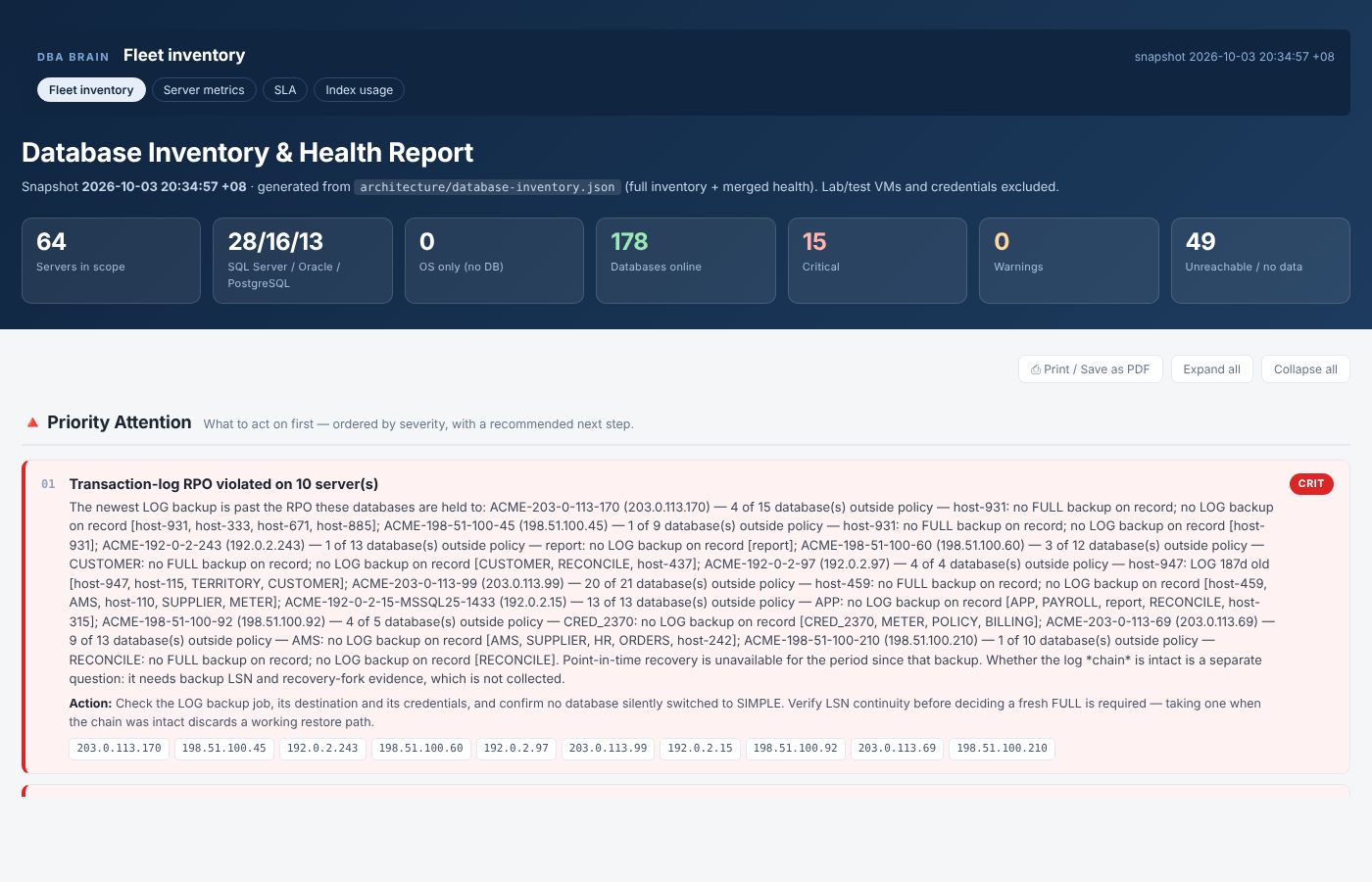
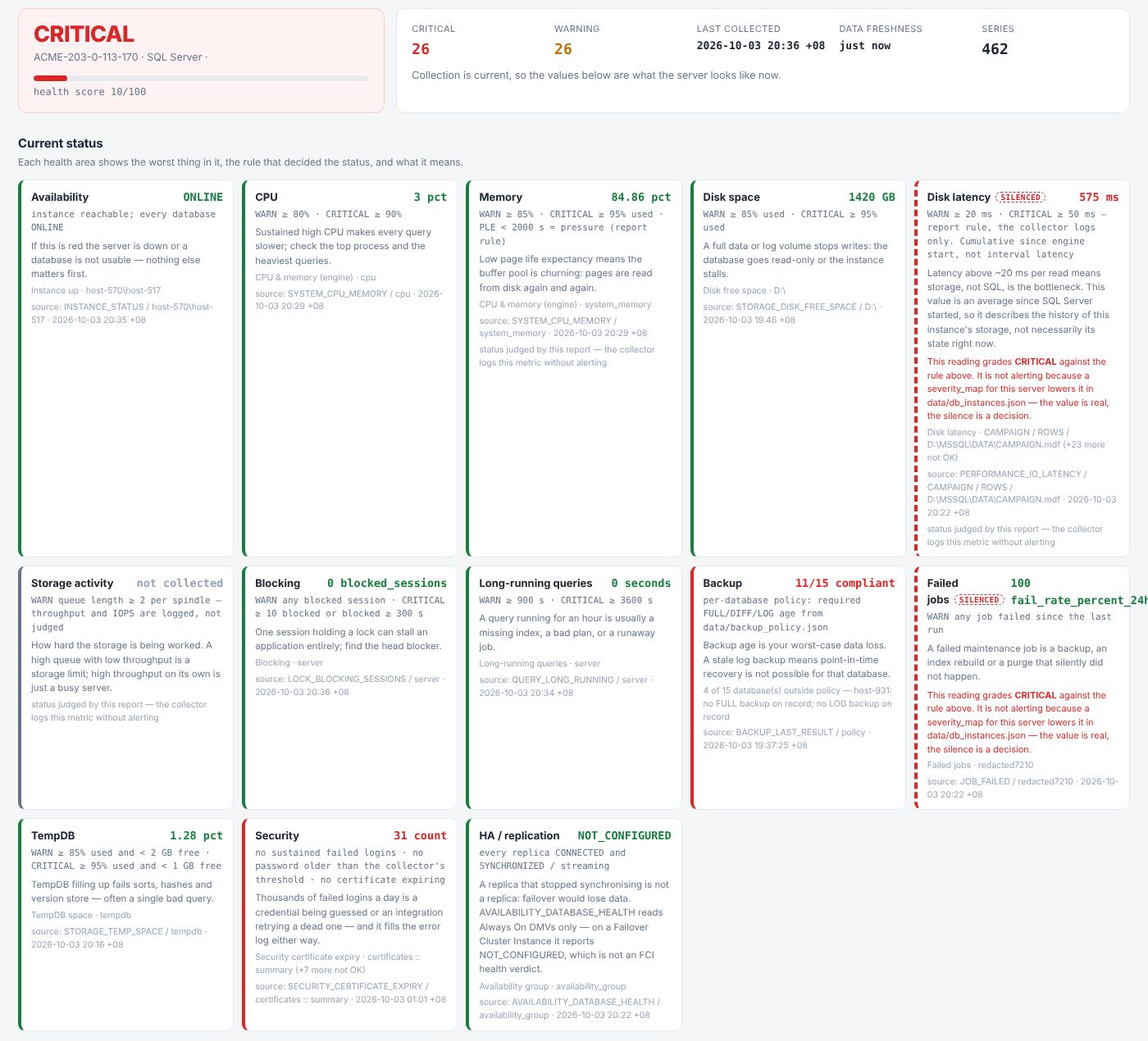
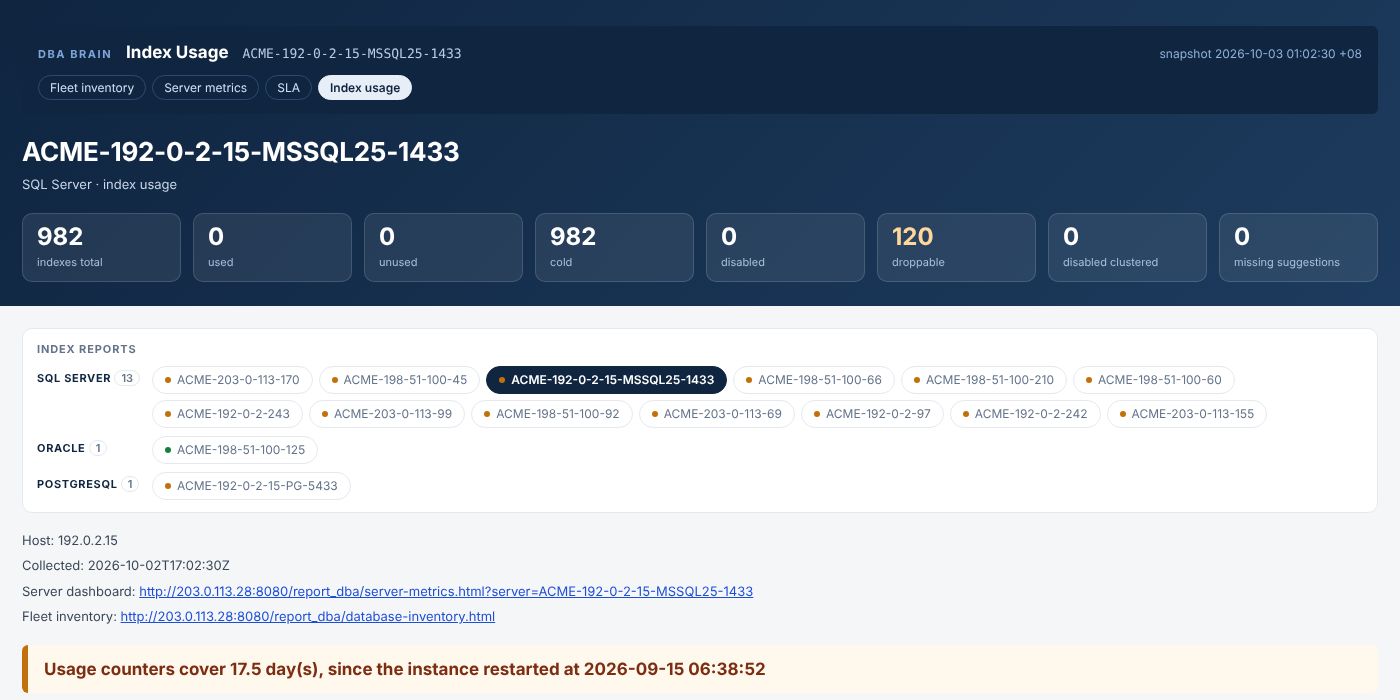
Fleet inventory, per-server metrics, index usage and SLA pages, with a freshness gate so a stale number is never reported as a current one.
SLA / SLO
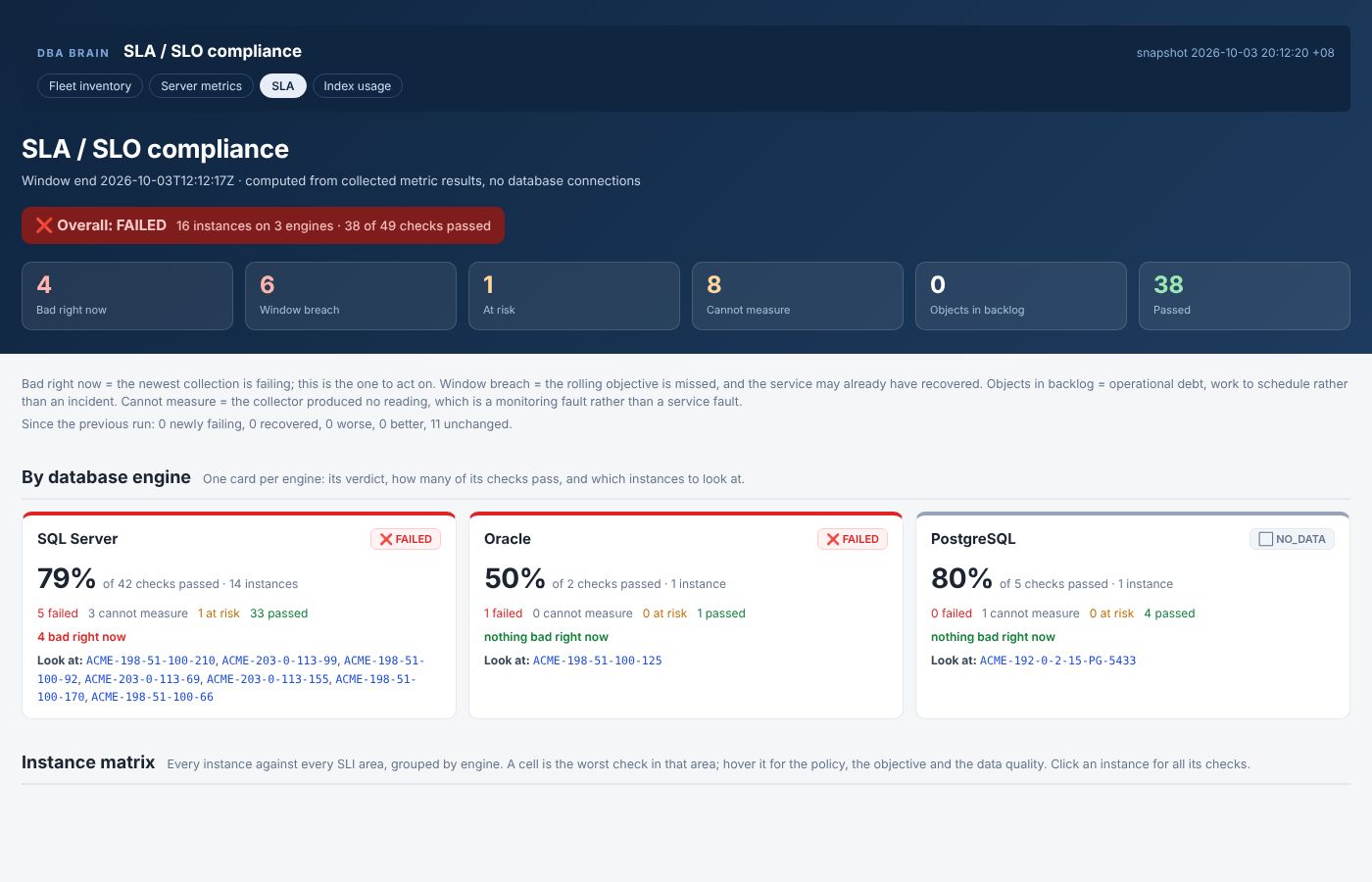
Indicators computed from stored measurement history, objectives evaluated with an error budget, and how much of it is left.
Alerts and chat commands
Telegram delivery, one message at a time. Commands people send back are gated by the person's clearance and the chat's.
Config as code
Every decision is a JSON file you keep in version control. A threshold change is a diff and a review, not an edit to somebody's script. A server never used again is retired the same way: entry-remove, credential-remove, instance-remove and report-server-remove each remove one record, the deepest first, refused while anything still names it (every place listed), and only a plan unless told to apply.
Secrets kept encrypted
PBKDF2-HMAC-SHA256 + Fernet. The passphrase is supplied at run time and never written to disk, a log or the store. Passwords travel on stdin, never argv. secret-remove takes one out, proven by the value it holds, and is refused while a login or an entry still names it.
AI assistant (optional)
Day-to-day support for the DBA and the DevOps engineer, on the databases and servers dbabrain watches. Ask in Telegram or at the terminal (dbabrain telegram ai-ask) - why is this alert firing, did last night's backups run, which jobs failed, what is slow on this server, which query regressed - and it finds the answer itself: the metrics, runs, backups and restores in dbabrain's store, the configuration and the logs, a read-only query on the server. It analyses queries - the heaviest by CPU, reads and duration, ad-hoc and single-use plans, plan regressions and plan changes (Query Store) - and indexes (usage, unused, fragmented, invalid). It explains what it found and what to do, and gives the exact command for the next step (a CLI line or a /spbot_ command), running a backup or a restore by hand included. It also walks a new install through its setup. It only reads and proposes; a person runs anything that changes something. It answers once your node has a free dbabrain key (dbabrain key-request), through dbabrain.dev - or on your own Anthropic key (dbabrain ai-key); every question, tool call, token and cost is kept, under limits you set.
MCP server for Claude
Every shared operation and the runtime store as MCP tools, each command's own gate kept, every answer redacted and capped. No secret enters through MCP, and none leaves.
What it is not
Not an AI that runs your estate on its own
It is the harness an AI model works through: better with an AI, complete without one. The scheduler, grading, backups and alerts are code and reviewed SQL; no model is needed for any of them. The optional built-in assistant, for the DBA's and DevOps engineer's daily work (its shipped name is Phanes; each install may rename it with assistant_name in ai_assist.json), answers through dbabrain.dev once the node has a dbabrain key (or on your own Anthropic key), reads through read-only tools, and proposes commands for a person to run.
Not a dashboard product
The primary interface is a CLI; the primary output is a record in a database you own.
Installs nothing on your databases
No agent, no extension, no stored procedure. It logs in with a read-only account and asks questions.
What it produces
Real report pages from a live estate, with every name replaced by a stable fake one. Open an image to see it full size.
One run, end to end
Whoever starts it (the daemon, a person, a chat command or an AI agent), a run takes the same path.
The app hands one JSON request to transport, which starts the shared operations CLI;
that CLI reaches the database or host and answers with one JSON envelope. Results land in the
runtime store, and reports and alerts are built from there.
The same envelope, every time
Every command answers in the same envelope, whether the work succeeded or not: seven keys that are always present, so a person, a script and an agent read a result the same way.
{
  "success": true,
  "operation": "restore-full",
  "message": "Restored SALESDB_STG to
              2026-08-07 01:40:00.",
  "error": null,
  "error_kind": null,
  "data": { },
  "metrics": { "duration_ms": 41230 }
}From a measurement to an alert
- Collectabout ninety metrics across four engines
- Normaliseone shape for all engines
- Gradeagainst your policy in
data/*.json - Storein the runtime store
- Report, alert, SLAby severity and error budget
A backup is proven by restoring it
- Backupfull / diff / log
- Copyto a disposable target
- Restorelatest or point in time
- Verifythe result
- Recordwhat was proven, and when
- Clean upand apply retention
Why: cheap for an AI agent, fine without one
The command a person runs is byte-for-byte the command an agent runs, so there is one code path to audit, and every run is logged the same way whoever started it.
The saving is not compression. It is not sending what nobody needed to read. And no model is required: remove the agent and the daemon, schedules, reports and alerts all still run.
  WITHOUT a tool                  WITH DBA Brain
  agent -> raw SQL -> agent       agent -> DBA Brain -> database

  "check this database"           "check this database"
    -> SELECT ... dm_os_wait_stats  -> one JSON request
    <- every row, into the context
    -> SELECT ... sys.databases     <- one graded envelope:
    <- every row, into the context       41 checks, 40 OK,
    -> ... once per check, per run       1 WARNING: appdb
    <- all of it, healthy or not         log backup 31h old
With and without DBA Brain: four DBA tasks an AI agent did
Four tasks from the week version 0.41.0 soaked, each done by an AI agent working for a DBA. The agent and the databases were the same either way; what differs is what the agent has to hold, guess and read.
| Task | Without DBA Brain | With DBA Brain |
|---|---|---|
| The same linked-server query works on one SQL Server and fails on another | The agent needs a connection string and a password for each instance, pasted into its context or a script; it guesses a driver and an encryption setting per version (an old 2008 R2 and a 2017 here); the error comes back as a driver's text to parse. | One request per instance names its server_id; the inventory fills the connection, the secret store the password - the agent never sees one. The driver and encryption are chosen and reported (target_profile: version, OS, driver). The two instances' linked-server settings and provider versions were compared in a few read-only requests; the failing one had a provider build from before TLS 1.2 support. |
| A sync procedure returns nothing while the source system has the data | Read the procedure, rebuild its dynamic SQL by hand, run each step against the remote system over a linked server; any write the agent tries to test lands for real. | run-sql-adhoc rolls back unless told to commit, so the procedure's own body was run as is and with one join changed - 0 rows, then every row - before anything was altered. The change itself was committed only after a typed yes, with the reason recorded; the definition before and after was kept. |
| A query is slow, or a server was slow since yesterday | Query sys.dm_exec_requests, wait stats and the plan cache now; what happened yesterday is gone unless someone was watching. Each check is a result set the agent reads in full. |
The metrics are already collected on a schedule and kept: long-running and blocking sessions, waits, top queries by CPU / elapsed / reads, Query Store regressions, I/O latency - each graded OK / WARNING / CRITICAL, with history. The agent asks "since when" of the store, reads the graded verdict, and pulls the evidence only for what is not OK. trace-session names who holds an open transaction. |
| Is this server's workload heavy, and what drives it? | Sample counters a few times, by hand, and extrapolate; the numbers depend on when they were taken. | The report's per-server page carries the Workload section: CPU (the engine's and the host's), batches, transactions, compilations, reads and writes, waits, log by database, top queries - from the same history. The agent reads one page or one store query instead of sampling. |
What does not change: DBA Brain does not decide the fix. It gives the agent a connection it does not hold,
a verdict instead of raw rows, a history it did not have to collect, and a write path that is rolled back
unless a person says yes. Every run, the agent's included, is a row in job_runs and a line in a
log, so what the agent did is the same query as what the daemon did.
How a model reaches your estate: no public IP, no inbound port, no server
In every way below the connection is opened from your machine, outward. Nothing on the internet connects in, and the commands run on your machine with your credentials.
| Way | What runs where | What the network needs |
|---|---|---|
The assistantkey-request, then dbabrain telegram ai-ask or Telegram |
Your node sends the question to dbabrain.dev, which passes it to the model's API (or, with ai-key, straight to the API on your own Anthropic key); the model answers with the dbabrain tools it wants run; your node runs them (read-only) and sends the results in the next request, until the model answers. |
Outbound HTTPS to mcp.dbabrain.dev:443 (with ai-key: api.anthropic.com:443; through http_proxy in data/ai_assist.json when you need one). Telegram is polled outbound (getUpdates to api.telegram.org:443): no webhook. |
| An AI app on the same machineClaude Desktop, Claude Code, any MCP client | The app starts dbabrain mcp serve as a child process and talks to it over stdin/stdout. |
Nothing from dbabrain; the app talks to its own model. |
| claude.ai on the web or a phone | dbabrain mcp connect links your node to the remote connector at mcp.dbabrain.dev and keeps one WebSocket open from your node; claude.ai's requests come down it. |
Outbound HTTPS/WebSocket to mcp.dbabrain.dev:443. The public endpoint is dbabrain.dev's, not yours. |
Only dbabrain mcp serve --http, serving MCP yourself, needs an address others can reach, and it is behind a bearer token.
No secret enters through MCP, and none leaves
A request carrying a password, a key or a token is refused before it runs. The person types secrets
on the node (dbabrain common secret-set -, dbabrain ai-key) and the model
names them by reference (password_ref). A login the node completes from its own
encrypted store is not such a secret: the model names the server_id. Every answer is
redacted before the model reads it.
A backup that outlives the host it came from
A backup kept on the database host is lost together with it. A dead disk takes the database and every backup written next to it, so a backup on the same disk as the database is one of the biggest holes there is. A lost host, or any other failure of that machine, takes every disk it has. Ransomware goes further: it encrypts every drive and every share the infected host can write to.
DBA Brain proves every backup at each step, keeps a proven copy away from the database host, and can keep that copy encrypted there.
Every box is a step DBA Brain runs and records. The dashed line is optional: deleting the source is a switch per entry, off by default.
Each backup run, step by step
FULL, DIFF and LOG backups for SQL Server; a base backup plus WAL for PostgreSQL; RMAN for Oracle. Every level says the same ten steps, one message each; which of them reach a chat is the job's notify.
- Backup process startedthe level, the time, and a line of the steps it runs; a step the entry has off is said
off - Backup on the server startedon the database host
- Backup on the server doneverified by the engine, hashed at the source; an Oracle backup records its RMAN chain
- Copy to the repository startedright after the backup, in the same pass
- Copy to the repository doneproven by checksum and bytes; the instance's metadata carried too, sealed
- Encrypt startedwith
age, on the repository - Encrypt doneor waiting while an earlier pass's encryption still runs: not a failure
- Plain files clearedthis backup's, at the source and on the repository
- Repository upkeep doneearlier backups released, retention, late encryption, the check
- Backup process doneor
FAILED at step N, with why
A backup with nothing for a repository says 1, 2, 3 and 10. A later pass takes only what a backup left (a copy to try again, files past offload_files_per_pass, an encryption still running) and says its steps the same way. Each step says what it read, not what it assumed: step 8 counts the files deleted and kept, step 9 says each part's work, nothing or off.
What every backup is held to
Verified by the engine
SQL Server RESTORE VERIFYONLY WITH CHECKSUM, PostgreSQL pg_verifybackup, Oracle RMAN VALIDATE. An Oracle backup states its SID (oracle_sid) and is held to the instance that answers before RMAN runs; after each run it records its RMAN chain (record_chain). A PostgreSQL base backup is catalogued file by file.
Hash at the source
SHA-256 and size in bytes, taken on the database host when the backup ends and stored in the catalog on another host. The first hash can never be changed, not even by a direct UPDATE: a database trigger refuses it.
Re-check stored files
After every backup run, older files of its entry are hashed again, those checked longest ago first, so within days every stored file has been re-read: ransomware encrypts last week's backups, not tonight's. A changed file shows CHANGED, a vanished one MISSING, and the alert is CRITICAL. By hand: verify-backup-files.
Look for ransomware markers
After each run the backup folder is listed for what ransomware leaves: ransom notes such as read-me*.txt, locked-file names such as *.L0CK3D or *.locked. A hit is CRITICAL and engages the lockdown. A new file three times the size of its history, or a third of it, is a WARNING.
Copy to the repository
Right after each backup, in the same pass, its files are copied to a Linux host outside the database host, over SSH. The source is held to its backup's checksum, the copy is hashed there and compared by checksum and bytes, and copied again on a mismatch up to offload_copy_max_retry; every attempt is recorded.
Encrypt it there
With offload_encrypt, each file is encrypted with age for the key's public half only, so the repository cannot decrypt what it holds. The .age file is streamed back and decrypted, and held to the backup's bytes and SHA-256, before the plain copy goes. One key ring per server; a key encrypts for a stated number of days and decrypts for ever.
Verified, then the source may go
Only a copy proven, and wholly encrypted when the entry encrypts, may release the source, and it is hashed again just before. Each file is deleted by its own command, held to its recorded size and SHA-256. A switch per entry, off by default, and never during a lockdown.
The lockdown
Engaged by three or more stored files changed or gone, or by a ransomware marker; only a person turns it off, with a note (dbabrain control lockdown, or /spbot_lockdown in Telegram). While it is on nothing is pruned, deleted or replaced; backups, the scrub and alerts keep running.
Each restore, step by step
On a schedule or by hand, onto the target the entry names. A dry run first says what it would copy, where each database lands and what would refuse it. A restore says eleven steps, the same numbers on every engine; which of them reach a chat is the entry's notify.
- Restore process startedwith a line of the steps it runs
- Copy to the targetstarted and done; decrypted on the way from the repository
- Instance metadata before the restoreor not restored, with why
- Certificaterestored, or none, with why
- Restore fulla start and a done per database
- Restore diffa start and a done per database, or none, with why
- Restore logone message per file; skipped or FAILED, with why
- Checkstarted and done
- Instance metadata after the restorereplayed after the check
- Plain files clearedthe decrypted copies on the target
- Restore process doneor
FAILED at step N, with the engine's words
A step that does not apply is still said, with why. On PostgreSQL step 5 is the base backup (its incrementals combined) and on Oracle the RMAN duplicate, with 6 and 7 said inside it; 3, 4 and 9 are said as not applying, because their logins are inside the physical backup and there is no certificate step. A restore in place says 2 and 10 as not applying; a copy-only run says 1, 2 and 11.
What every restore is held to
From the repository, or the source
SQL Server, PostgreSQL and Oracle restore from the repository's proven copies (restore_from: "repository"), decrypted on the way, or from the source server. Only the chain that reaches the moment asked is copied, and every staged file is held to its recorded checksum and bytes. An Oracle restore takes the RMAN chain its backup recorded, newest or to a moment, and is refused before anything is copied when a piece of it is missing.
Latest, or a point in time
On SQL Server, PostgreSQL and Oracle, wherever the logs cover the moment: transaction log backups, WAL, archived logs. On Oracle and PostgreSQL the moment is read in the source database's own clock, asked of it, and refused when that clock cannot be known: never assumed UTC. A SQL Server restore is held to where it was asked to stop: the target's own restore history is read back, and a difference fails the restore.
The instance around the databases
A backup can seal the instance's metadata (logins, jobs, configuration) into the repository with age, so the repository never holds it in the clear. A restore reads it from the node, a server's folder or the repository, as its entry says, and replays it before and after the databases (steps 3 and 9). A bundle that cannot be had skips the phase with why and never loses the restore.
Nothing replaced unless stated
overwrite_existing is required on every restore entry, true or false. With false a restore never replaces an existing database: SQL Server stops on a database of that name in any state, PostgreSQL on a data directory that holds a cluster of its own, Oracle on a database that holds its own schemas.
Opened and checked
A restore is not done until the restored databases open to a real query, and the engine's own consistency check runs on them (checkdb): DBCC CHECKDB, pg_amcheck, RMAN VALIDATE. A SQL Server restore that failed part way can be continued after the last backup the target applied.
Every file recorded, in order
Every backup file a restore applied (the full, the differential, each log) is recorded in the order it went in, written before the first step runs, so a restore that dies leaves the chain it meant to apply. The backup page and each server page list the restores and their files.
Onto SQL Server on Windows
A restore from the repository onto SQL Server running natively on Windows, over the host's OpenSSH: free space read by PowerShell, files written over SFTP to a staging folder on a drive path, and the verified deletes run there too.
Not built, or not run yet: a PostgreSQL or Oracle restore under another name (RENAME / DUPLICATE TO; an entry mapping a name for those engines is refused); a point in time on Oracle or PostgreSQL from a source not on UTC, not yet run on a host; a restore through MCP (restore-by-id runs on the node). After a PostgreSQL or Oracle restore the target's logins are the source's: the whole instance is the source's, and the target's stored password logs in again only once it is set again.
Configuration
Every field that decides a backup or a restore is stated, so nothing is left to a default nobody
wrote down. upgrade-config writes into existing entries the values they have been
running on, such as offload_enabled: false, offload_delete_source: false
and restore_from: "server", and overwrite_existing: false, never
true: an entry meant to replace a database states true itself. It cannot know an
Oracle entry's oracle_sid: an entry without one is refused, naming the field.
{
  "backups": [
    {
      "backup_id": "APPDB_FULL",
      "server_id": "db-server",
      "jobs": [
        { "job": "database", "databases": ["APPDB", "SALESDB"], "all_databases": false },
        { "job": "log", "databases": [], "all_databases": true }
      ],
      "offload_enabled": true,
      "offload_server_id": "repository-vm",
      "offload_folder": "/srv/backups",
      "offload_copy_max_retry": 3,
      "offload_encrypt": true,
      "offload_encrypt_key_days": 90,
      "offload_delete_source": false,
      "offload_source_share": "",
      "offload_source_username": "",
      "offload_source_password_ref": ""
    }
  ],
  "restores": [
    {
      "restore_id": "APPDB_TO_DRILL",
      "server_id": "db-server",
      "target_server_id": "drill-vm",
      "restore_from": "repository",
      "overwrite_existing": false,
      "database_mappings": [
        { "source_database": "APPDB", "target_database": "APPDB_DRILL" }
      ]
    }
  ]
}
An excerpt of the backup_restore block in data/restore_config.json: the fields this flow uses. The rest of each entry is left out.
- A backup job names its databases as a list, or an empty list with
"all_databases": true. offload_*on a backup entry: the repository byserver_idand folder, the copy retries, whether the copy is encrypted there and for how many days a key encrypts, and whether the source may be deleted once the copy is verified.- A Windows source is read over SMB (
offload_source_share,offload_source_usernameandoffload_source_password_ref, the three together) or over the SSH it already answers (offload_transfer: "sftp"). - A restore entry states
restore_from("server"or"repository") andoverwrite_existing(trueorfalse).falsenever replaces a database that exists on the target. - An Oracle backup entry states
oracle_sidandrecord_chain. A restore entry statesserver_metadata.enabled, and when it is on, where the instance's metadata comes from:source"node","server"or"repository", with itspath; a backup entry'srepository_pathis where its offload carries the sealed metadata. - A script-driven SQL Server restore names its databases:
database_mappings(source_databasetotarget_database; another name restores it beside what the target holds) or"restore_all_databases": true, one of the two.
16 components
Eleven apps, each doing one job with its own CLI and never importing another app, and five shared layers that every app stands on. The list is closed, and every component has exactly one reference doc.
Who may call whom
commonmay not be imported: it is only ever run as a CLI.libmay not run a CLI: it is only ever imported.- No app imports another app. No shared layer imports an app.
- Each rule has a guard test beside it, so the diagram describes what is true, not just what was intended.
Apps
03App command daemon
dbabrain/jobs · dbabrain daemonThe scheduler: runs each app on its own interval inside its allowed hours, skips one that is still running.
04Metrics engine
dbabrain/metricsAround ninety metrics across four engines, collected and normalised into one shape.
05SQL task runner
dbabrain/sql_tasksYour own SQL, on a schedule or on request, against approved targets, as text or a spreadsheet.
06Reports
dbabrain/reportsScheduled reports and inventory pages, with a freshness gate against stale numbers.
07Chat delivery and commands
dbabrain/telegramDelivers the outgoing queue and executes commands, gated by the person's and the chat's clearance.
08Backup / restore
dbabrain/backup_restoreRuns backups, restores them onto a disposable target, verifies, and records what was proven.
09SLA / SLO compliance
dbabrain/slaIndicators from stored measurement history, objectives with an error budget.
10SRE
dbabrain/sreProvisions disposable lab databases for drills: single instances or small HA clusters, in Docker or on VMs.
11Control
dbabrain/controlBuilds and deploys the toolkit to another node, and watches the toolkit itself.
12Web host
dbabrain/webhostServes the rendered reports over HTTP and hosts the console. Publishes files, never generates them.
16MCP server
dbabrain/mcpEvery common.cli command and the runtime store as MCP tools for Claude, each command's own gate kept, every answer redacted and capped.
Shared layers
01Runtime store
dbabrain/dbThe toolkit's own data: job runs, measurements, report state, delivery queue, restore history. SQLite to start, PostgreSQL later.
02Logging engine
dbabrain/logging_opsScoped application logs, runtime logs, shared errors and daily archives.
13Common
dbabrain/common · CLI onlyReaching a host, running SQL, moving a file, rotating a password. Every command takes one JSON object.
14Lib
dbabrain/lib · import onlyPure rules: time windows, notify routing, severity, formatting. Imports nothing from the rest.
15Transport
dbabrain/transportThe one client: starts common.cli and db.cli for every component. Imports only lib.
DBA Brain or a folder of scripts
What changes when the checks, backups and reports move out of a dozen cron jobs and ad-hoc scripts, or out of an agent writing raw SQL.
| What you need | DBA Brain | Cron jobs and ad-hoc scripts |
|---|---|---|
| Thresholds and scheduleswhere each decision lives | JSON files you keep in version control: a change is a diff and a review | Inside each script: a change is an edit to somebody's script |
| A backup you can trusthow you know it restores | Restored onto a disposable target and verified: the restore is the proof | A file on disk, unless you build and schedule your own restore drill |
| A record of every runwhat ran last night, and who started it | A row in job_runs and a log line of the same shape, whoever started it |
Whatever each script chose to log |
| A run that faileddoing it again | Replayed by hand from the same JSON request | Up to each script |
| Stale numbersa collection that stopped | A freshness gate: a stale number is never reported as a current one | Up to each script |
| Passwordsat rest and in flight | Encrypted at rest (PBKDF2-HMAC-SHA256 + Fernet), passed on stdin, never on the command line | Wherever each script keeps them |
| An AI agent at the databasewhat it is allowed to do | The commands that exist, each reviewed when it was written and logged like a person's run | SQL composed from prose: the blast radius is whatever it happened to write |
| What the agent readstokens per check | A graded verdict, then the evidence only for what came back bad | Every row of every check, healthy or not |
| On the monitored machineswhat gets installed | Nothing: a connection and a credential you already have | Nothing either |
Every line on the DBA Brain side is taken from the project's README.
Free. All of it.
DBA Brain is free and open source under the Apache License 2.0: the source, the docs and every release on PyPI.
Open source
$0 Apache License 2.0
Use it, change it and run it, commercially too, as the license allows.
- All sixteen components: metrics, SQL tasks, reports, backups and restore drills, SLA, chat alerts, the MCP server
- SQL Server, Oracle, PostgreSQL and MySQL, one pip extra each
- Runs on your machines; nothing is sent that you did not switch on
- A free dbabrain key (an email sign-in) for reports, backup / restore and $1 of AI a month
- Source, docs and changelog on GitHub
Support the project
Get in touch
DBA Brain is maintained by one person. Help is welcome in any of these forms.
- Donations that keep it maintained
- Sponsorship of the project
- Investment or partnership
- Developers who want to build it further with us
- Bug reports and feature requests on GitHub issues
Get started
Python 3.12+. Each database driver is an extra, so you install only what you run. Published on PyPI via trusted publishing.
| Extra | For |
|---|---|
[postgres] | PostgreSQL, pure Python |
[mysql] | MySQL / MariaDB, pure Python |
[oracle] | Oracle, no client library needed for 12.1 and newer |
[mssql] | SQL Server, also needs Microsoft's ODBC driver |
[ssh], [winrm] | OS-level metrics on Linux / Windows hosts |
[ai] | the optional AI assistant |
[mcp] | the MCP server for Claude |
[all] | everything |
Install
python -m venv .venv
.venv/bin/pip install 'dbabrain[postgres,ai]'
dbabrain init                   # in an empty folder: the tool root
dbabrain key-request            # free; reports, backup / restore and the AI need it
Metrics and alerts run without a key; what a key unlocks, and how long it lasts.
Five-minute try-out with a throwaway PostgreSQL container
cd examples/postgres-quickstart
docker compose up -d
dbabrain db      --config config.json init
dbabrain metrics --config config.json collect --dry-run
dbabrain metrics --config config.json collect
dbabrain metrics --config config.json report
Questions people ask first
Does it install anything on my databases?
No. No agent, no extension, no stored procedure. It logs in with a read-only account and asks questions, and reaches hosts the way an operator does: over a connection and a credential you already have.
Does it send my data anywhere?
No telemetry, no usage reporting, no update check. It connects to the databases and hosts you list; with a dbabrain key, once a day to dbabrain.dev to check that key; and only if you turn each on, to a chat service and to the AI (through dbabrain.dev, or a model's API on your own key). Nothing else. The daily check sends the key alone - nothing about your databases. In every way a model reaches your estate the connection is opened from your machine, outward: no public IP, no inbound port, no server (how a model reaches your estate).
Which databases does it work with?
SQL Server, Oracle, PostgreSQL and MySQL / MariaDB, each through its own pip extra, plus OS-level metrics on Linux and Windows hosts over SSH or WinRM. Around ninety metrics across the four engines.
Is it used in production?
Yes. The main functions are stable and run in production - on an estate of many SQL Server instances, with a few Oracle and PostgreSQL instances under modest workloads. MySQL and heavier workloads are supported, with less production mileage so far.
Is it an AI agent? Do I need one?
It is the harness an AI model works through: better with an AI, complete without one. The scheduler, the grading, the backups and the alerts are code and reviewed SQL; no model is needed for any of them, and with the AI or without it every collection, backup, report and alert runs exactly the same.
The optional built-in assistant is day-to-day support for the DBA and the DevOps engineer: it reads alerts, backups, jobs, slow queries, plan regressions and indexes itself, explains them, and gives the exact command for the next step (its shipped name is Phanes; each install may rename it with assistant_name in ai_assist.json). It answers once your node has a free dbabrain key (dbabrain key-request, an email sign-in on dbabrain.dev) - through dbabrain.dev, with no Anthropic key of yours - reads through read-only tools, and proposes commands for a person to run. On a new install the key is the first step after dbabrain init and the passphrase; dbabrain ai-key uses your own Anthropic key instead. Then ask it in a terminal (dbabrain telegram ai-ask "What do I set up next?") or in Telegram. An AI client can also drive dbabrain directly over MCP (dbabrain mcp serve).
Is there a web console?
The web host serves the reports and a console that edits configuration. Adding an instance from a browser (host, port, user, password) is not in it: the supported path is writing the JSON files, by hand or with an agent; the first-run guide walks through it.
Where does it keep its own data?
In the runtime store: job runs, measurements, report state, the delivery queue and restore history. SQLite to start, PostgreSQL when you outgrow it; the backend is one word in one file.
How are passwords kept?
Encrypted: PBKDF2-HMAC-SHA256 over a per-file salt, sealed with Fernet. The passphrase is supplied at run time and never written to disk, a log or the store. A request carrying a password goes on stdin, never on the command line. Configuration names a reference, resolved from the environment first, so an external secret manager works too. No secret enters through MCP: a request carrying a password, a key or a token is refused, and the model names a secret by its reference.
Who is it for?
A DBA or a small team with a handful to a few dozen instances across more than one engine; the DevOps or SRE owner who gets paged about a database without being a DBA; and whoever builds an agent that has to touch a database without handing it a shell. If you have one PostgreSQL cluster and a hosted monitoring product you are happy with, it is more machinery than you need.
What does it cost?
Nothing. It is free and open source under the Apache License 2.0. It is maintained by one person; if you would like to donate, sponsor or invest, see the contact page.
Read more
One throwaway container, seven real measurements
The PostgreSQL quickstart needs no system packages: a container, a least-privilege login, seven real measurements, and nothing to uninstall afterwards.